<?xml version="1.0" encoding="utf-8"?><feed xmlns="http://www.w3.org/2005/Atom" ><generator uri="https://jekyllrb.com/" version="3.10.0">Jekyll</generator><link href="https://www.richardadleta.com/feed.xml" rel="self" type="application/atom+xml" /><link href="https://www.richardadleta.com/" rel="alternate" type="text/html" /><updated>2026-10-14T23:56:18+00:00</updated><id>https://www.richardadleta.com/feed.xml</id><title type="html">Richard Adleta</title><subtitle>Richard Adleta, Hands-On Senior Software Architect &amp; Full-Stack Engineer, passionate about hands-on coding, AI, and building innovative, scalable software solutions.</subtitle><author><name>Richard Adleta</name><email>radleta@gmail.com</email></author><entry><title type="html">I Hadn’t Written a Resume Since 2008—So I Coded One Instead</title><link href="https://www.richardadleta.com/posts/resume-viewer-intro" rel="alternate" type="text/html" title="I Hadn’t Written a Resume Since 2008—So I Coded One Instead" /><published>2025-05-09T13:40:00+00:00</published><updated>2025-05-09T13:40:00+00:00</updated><id>https://www.richardadleta.com/posts/resume-viewer-intro</id><content type="html" xml:base="https://www.richardadleta.com/posts/resume-viewer-intro"><![CDATA[<blockquote>
  <p><strong>TL;DR:</strong><br />
I needed a resume for the first time in years—so I built an interactive, data-driven <a href="https://resume-viewer.richardadleta.com/">Resume Viewer</a> in React.<br />
It’s not just a PDF: it’s a web app that visualizes my experience, skills, and career journey with custom views, structured data, and transparent design.<br />
<a href="https://resume-viewer.richardadleta.com/">Explore the prototype</a>, <a href="https://github.com/radleta/resume-viewer">see the code on GitHub</a>, or <a href="mailto:radleta@gmail.com">contact me</a> to learn more.</p>
</blockquote>

<p>A few weeks ago, something hit me:</p>

<p><strong>This was the first time since 2008 I actually needed a resume.</strong></p>

<p>Not just to update one—but to truly <em>use</em> it. To stand out. To get noticed. To say, “Hey, here’s what I can do,” in a way that actually lands.</p>

<p>But after 20+ years of building software—scaling platforms, leading teams, and writing enough code to fill a small library—a two-page PDF just felt wrong. Flat. Lifeless.</p>

<p>So instead of formatting another résumé in Word…</p>

<p><strong>I built one in React.</strong></p>

<h2 id="️-i-didnt-want-to-tell-you-i-wanted-to-show-you">⚡️ I Didn’t Want to Tell You. I Wanted to <em>Show</em> You.</h2>

<p>When I saw a job posting that really excited me, I started asking:</p>

<blockquote>
  <p>“How do I get someone to see me?”<br />
“What can I create that shows—not tells—what I bring to the table?”</p>
</blockquote>

<p>That was two weeks ago.</p>

<p>Since then, I’ve been sprinting.</p>

<p>Not on cover letters.</p>

<p>But on code.</p>

<h2 id="-introducing-the-resume-viewer-prototype-v01">🛠 Introducing: The Resume Viewer (Prototype v0.1)</h2>

<p>I built a custom, interactive <strong>resume viewer</strong> using:</p>

<ul>
  <li><strong>React</strong>, <strong>Tailwind CSS</strong>, and <strong>TypeScript</strong></li>
  <li>JSON Resume schema as the content engine</li>
  <li>Hosted on GitHub Pages and free to use for personal purposes</li>
</ul>

<p>This isn’t just a resumé with animations. It’s a <strong>touchable artifact</strong>—a tool that lets employers <em>feel</em> how I think:</p>

<ul>
  <li>Frontend polish</li>
  <li>UX structure</li>
  <li>Data modeling</li>
  <li>And the engineering thought process behind it</li>
</ul>

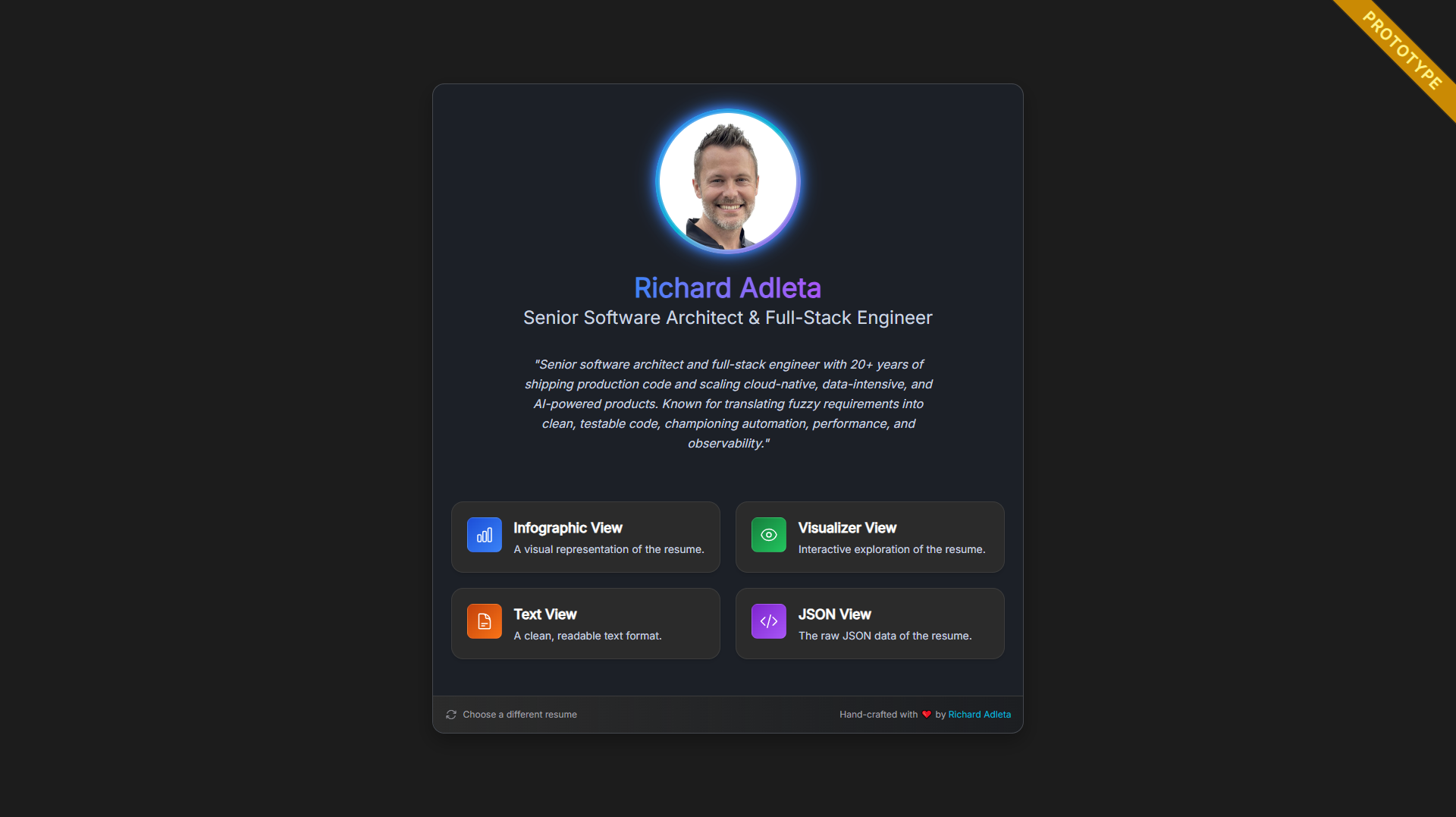
<figure class=""><a href="/assets/resume-viewer/0.1.1/resume-viewer-home.png" class="image-popup" title="Landing page of the Resume Viewer with a Resume
"><img src="/assets/resume-viewer/0.1.1/resume-viewer-home.png" alt="Screenshot of landing page / home view" /></a><figcaption>
      Landing page of the Resume Viewer with a Resume

    </figcaption></figure>

<p>The Resume Viewer is more than a showcase—it’s a <strong>prototype web application</strong> designed to highlight my professional web development skills. It demonstrates my expertise in <strong>coding</strong>, <strong>UX design</strong>, and <strong>data analysis</strong>, while serving as a public portfolio piece for potential employers.</p>

<h2 id="-four-views-one-purpose">🧭 Four Views. One Purpose.</h2>

<p>I built the Resume Viewer around four primary views—each with a different focus, each in various stages of completion. Each view is a different lens on my experience, and each is evolving as I experiment and get feedback.</p>

<h3 id="1-visualizer-view">1. Visualizer View</h3>

<blockquote>
  <p>“I built an animated timeline using D3.js that visualizes my career over time—something no PDF can ever do.”</p>
</blockquote>

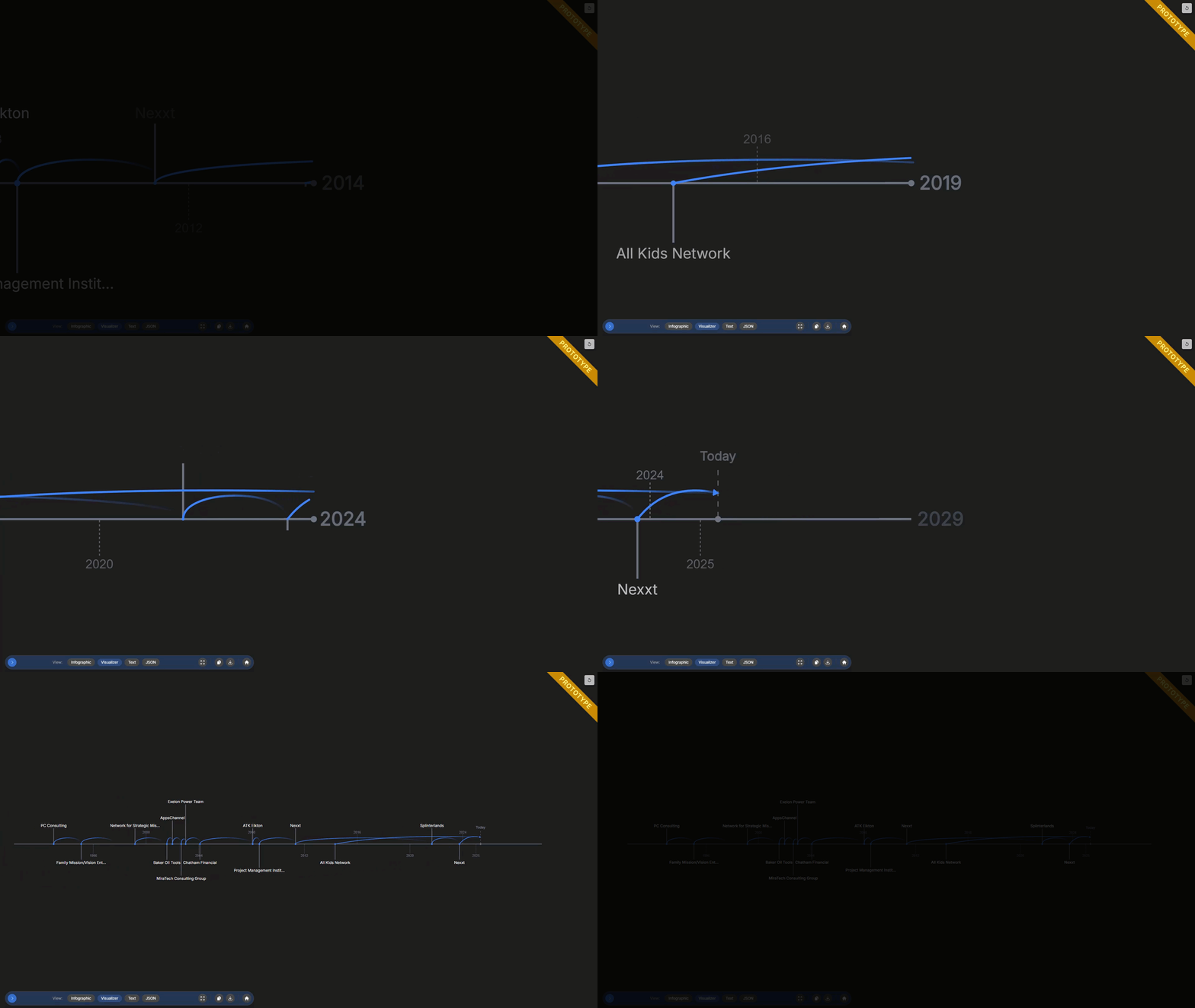
<figure class=""><a href="/assets/resume-viewer/0.1.1/resume-viewer-visualizer.gif" class="image-popup" title="Interactive timeline of experience with D3.js
"><img src="/assets/resume-viewer/0.1.1/resume-viewer-visualizer.gif" alt="Animated GIF of interactive timeline" /></a><figcaption>
      Interactive timeline of experience with D3.js

    </figcaption></figure>

<p>This is the heart of the project—a dynamic, D3.js-powered timeline that visualizes my career journey. Right now, you can zoom and pan across the years, and see how the companies I’ve worked at changed over time. But this is just the beginning.</p>

<p><strong>Where I want to take it:</strong></p>

<p>I’m aiming for a truly interactive experience. Imagine being able to click on a job title and have the timeline zoom in, revealing more granular details—projects, skills used, even key achievements—animated right into view.</p>

<p>I want subtle data overlays: maybe skill trends, company logos, or even animated transitions that help you <em>feel</em> the flow of my career, not just read about it. The goal is to make exploring a resume as engaging as browsing a well-designed dashboard.</p>

<h3 id="2-text-view">2. Text View</h3>

<blockquote>
  <p>“Printable, readable, and familiar. But with a twist.”</p>
</blockquote>

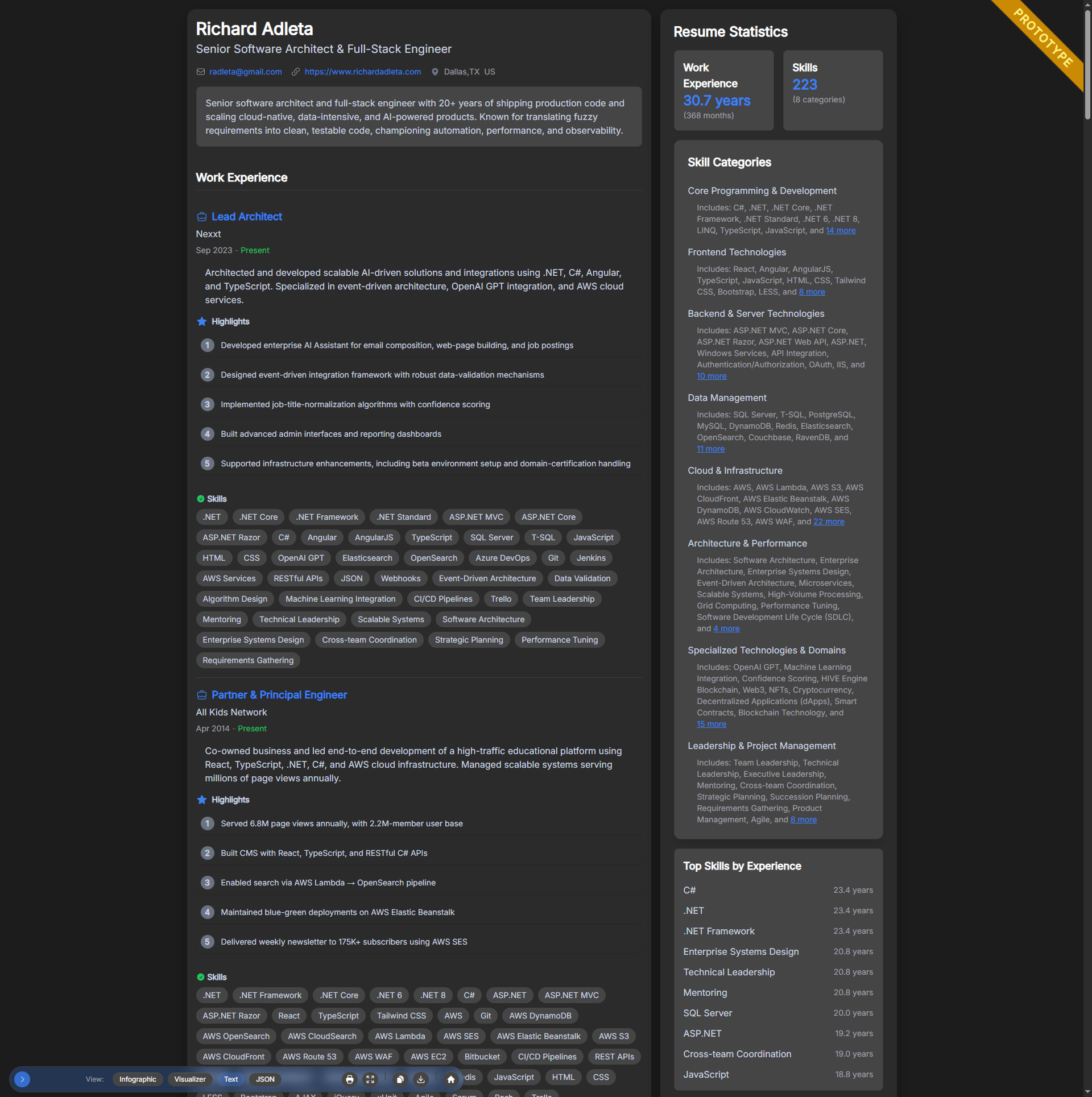
<figure class=""><a href="/assets/resume-viewer/0.1.1/resume-viewer-text.png" class="image-popup" title="Text view with inline skill analysis and job tagging
"><img src="/assets/resume-viewer/0.1.1/resume-viewer-text.png" alt="Screenshot of text view with inline skill analysis" /></a><figcaption>
      Text view with inline skill analysis and job tagging

    </figcaption></figure>

<p>This is the “classic” resume, but with a twist. It’s clean and structured, but also data-enhanced: you’ll see inline skill analysis, job tagging, and timeline insights woven right into the text. It’s designed to be instantly familiar to hiring managers, but with richer context and smarter organization.</p>

<p><strong>What’s next:</strong></p>

<p>I want to add more dynamic features—like toggling between condensed and expanded job descriptions, highlighting skills as you hover, and surfacing quick stats (e.g., “Most-used tech at this company”). The idea is to keep it readable, but make it smarter and more interactive than any PDF.</p>

<h3 id="3-infographic-view">3. Infographic View</h3>

<blockquote>
  <p>“I needed to show you the <em>concept</em>, even before the pixels were perfect. Because good feedback comes early.”</p>
</blockquote>

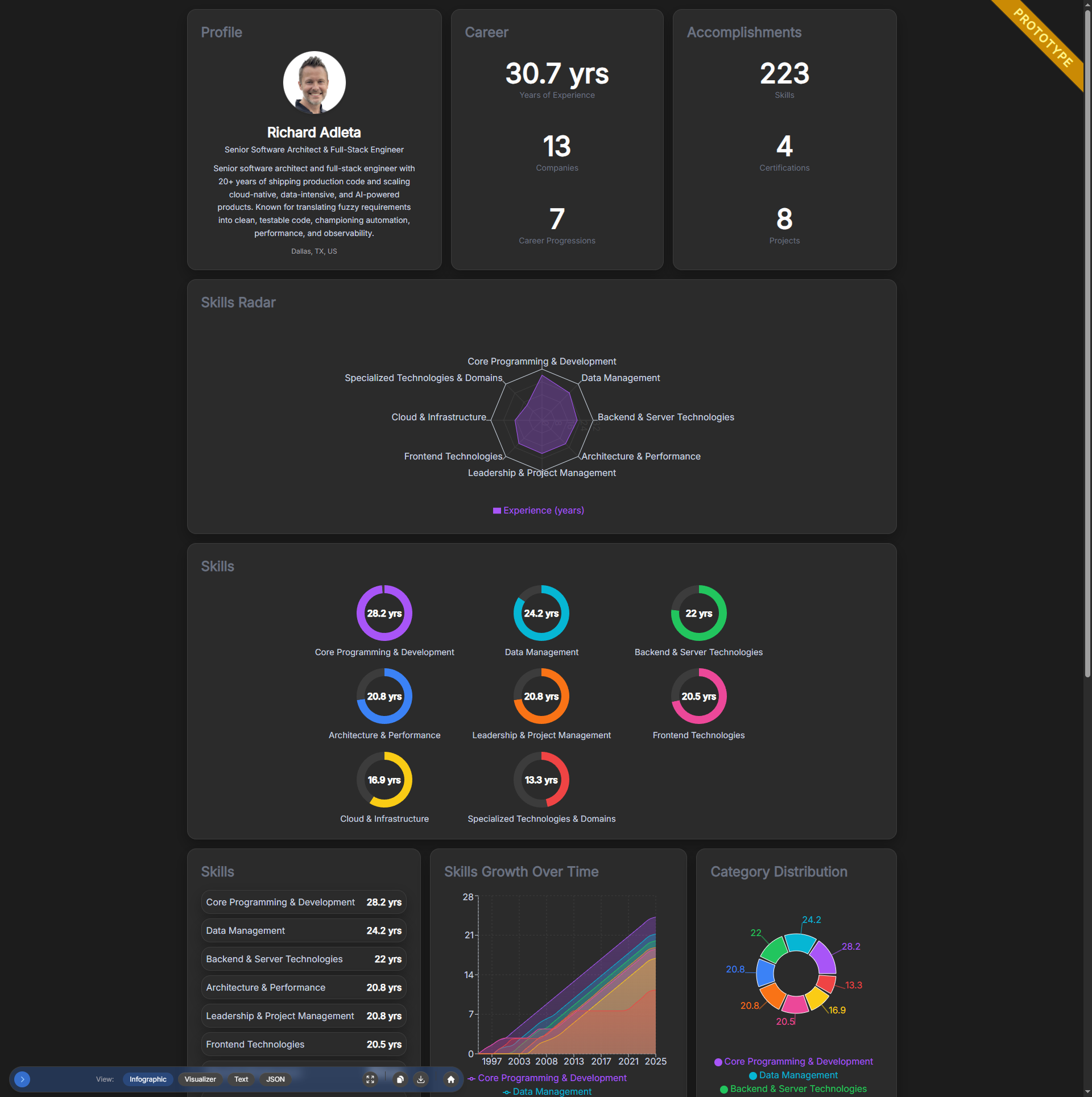
<figure class=""><a href="/assets/resume-viewer/0.1.1/resume-viewer-infographic.png" class="image-popup" title="Infographic view with company logos and skill maps
"><img src="/assets/resume-viewer/0.1.1/resume-viewer-infographic.png" alt="Screenshot of infographic view with company logos and skill maps" /></a><figcaption>
      Infographic view with company logos and skill maps

    </figcaption></figure>

<p>This is the least finished view, but intentionally so—what’s there now is a collection of early experiments, meant to show the many different ways resume data can be visualized. Think of it as a sandbox for ideas: company logos, skill maps, and role summaries, all in one place.</p>

<p><strong>Where I want to take it:</strong></p>

<p>My next step is to transform this into a true infographic of the person—something that instantly communicates high-level stats, number of jobs, years of experience, and top skills in a visually compelling way. But I don’t want it to stop at static charts. I want it to be interactive:</p>
<ul>
  <li>Quickly scan and digest the big picture—who I am, what I’m good at, and where I’ve been.</li>
  <li>Drill down into a specific skill and see how it’s evolved over time, or filter the entire infographic to highlight just that skill.</li>
  <li>Explore connections between roles, skills, and achievements, with animated transitions and interactive filtering.</li>
  <li>Allow hiring managers to get both a fast overview and the ability to dive deep, all in a beautiful, engaging presentation.</li>
</ul>

<p>Ultimately, I want the infographic view to be the fastest way to “get” someone’s story—at a glance and in depth, with both style and substance.</p>

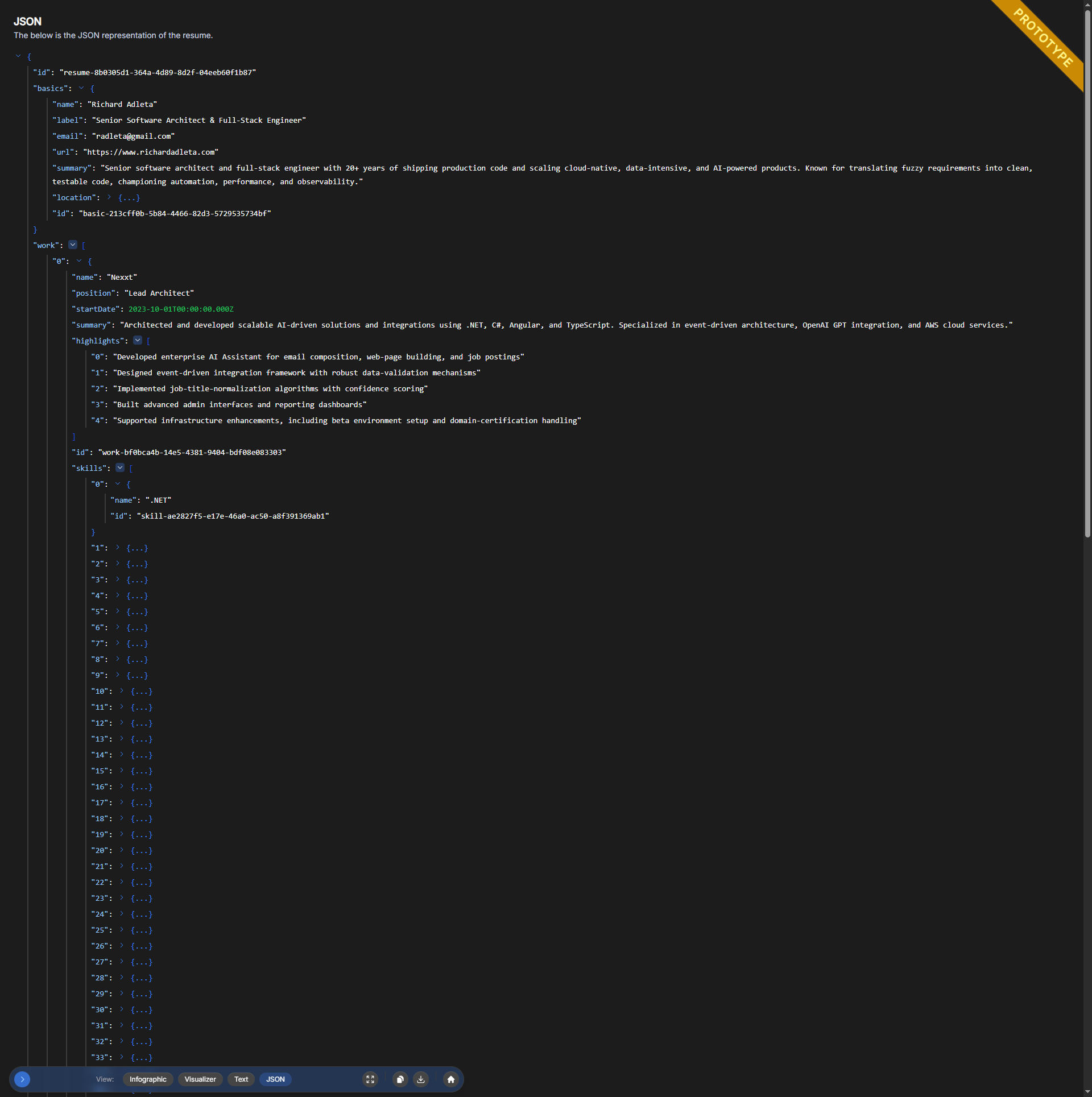
<h3 id="4-raw-json-view">4. Raw JSON View</h3>

<blockquote>
  <p>“I believe in observability and transparency. This view exposes the underlying resume data powering everything.”</p>
</blockquote>

<figure class=""><a href="/assets/resume-viewer/0.1.1/resume-viewer-json.png" class="image-popup" title="Raw JSON view of the resume schema
"><img src="/assets/resume-viewer/0.1.1/resume-viewer-json.png" alt="Screenshot of raw JSON view with schema" /></a><figcaption>
      Raw JSON view of the resume schema

    </figcaption></figure>

<p>I wanted to provide a direct window into the data behind the scenes—the actual JSON that powers the entire resume experience. Observability is important: this view lets you quickly look deeper into the raw data, making it easy to debug, troubleshoot, or just understand what’s really driving the presentation.</p>

<p>Right now, it simply shows the core data used to render everything. But my vision is to expand this further:</p>
<ul>
  <li>Show not just the raw data, but also the calculations, stats, and metadata that are derived from it—surfacing insights in a friendly, explorable way.</li>
  <li>Allow you to drill down into specific sections, see how stats are computed, and even download the JSON for your own use.</li>
  <li>Make it a tool for transparency, quick debugging, and deeper understanding of how the resume is structured and validated.</li>
</ul>

<p>All of this is built on top of Zod schema validation (with my own extensions), so you can trust that the data is both well-structured and extensible. If you want to see how the schema works, check out the documentation linked below.</p>

<h2 id="-the-data-behind-the-design">📊 The Data Behind the Design</h2>

<p>Let’s talk about what powers this whole thing: <strong>structured data</strong>.<br />
Instead of hardcoding my experience, I built the Resume Viewer around the <a href="https://jsonresume.org/schema">JSON Resume schema</a>—but I didn’t stop there.</p>

<p>The standard schema is a great starting point, but I wanted to go deeper. So I <strong>extended the base 1.0.0 schema</strong> to support richer modeling:</p>
<ul>
  <li>You can now associate specific skills with each job, not just a flat list.</li>
  <li>Skills can have their own time ranges, so you can see <em>when</em> and <em>where</em> I used them.</li>
  <li>Locations, references, and other attributes are now full objects, not just strings—making it possible to analyze and visualize my experience in new ways.</li>
</ul>

<p>This means the Resume Viewer isn’t just a static display. It’s <strong>data-driven</strong> and designed for exploration. Want to see which skills I used at which company? Or how my expertise evolved over time? Now you can.</p>

<p>If you’re curious about the technical details, I’ve documented the schema system—including how I layered custom extensions on top of the JSON Resume spec—right here:<br />
👉 <a href="https://github.com/radleta/resume-viewer/blob/main/lib/src/schema/README.md">Schema Documentation (README)</a></p>

<p>So, whether you’re a hiring manager, a fellow developer, or just someone who loves data, you can dig into the structure behind the scenes—and see how thoughtful modeling unlocks new ways to tell a story.</p>

<h2 id="-the-why-behind-it-all">🔍 The “Why” Behind It All</h2>

<blockquote>
  <p>“I’ve been heads-down building production systems for years, and ironically, none of that shows up in a GitHub profile.”</p>
</blockquote>

<p>This project was my way of fixing that.<br />
To show code. To show thinking.<br />
To give hiring teams something they can actually use and <em>feel</em>.</p>

<p>From scratch, I hand-built almost every component. The only external library? Recharts for some early data visualizations. Everything else? Custom—and proudly so.</p>

<h2 id="-a-prototype-in-motion">🧪 A Prototype in Motion</h2>

<figure class=""><a href="/assets/resume-viewer/0.1.1/resume-viewer-prototype.png" class="image-popup"><img src="/assets/resume-viewer/0.1.1/resume-viewer-prototype.png" alt="It&#39;s a prototype in motion" /></a></figure>

<p>This is very much a work in progress—and that’s by design.</p>

<p>I’m sharing it early, not because it’s perfect, but because I believe in building in the open and learning from real feedback. Every feature, every view, every bit of polish is evolving week by week. Some things are rough, some are experimental, and some are just sketches of what’s possible.</p>

<p>Here’s what’s on my radar for the next iterations:</p>

<ul>
  <li>Smarter filtering and drilldowns for skills and projects</li>
  <li>Dashboard-style metrics to visualize my tech stack usage</li>
  <li>More interactivity—think click-to-expand roles, skill timelines, and richer data exploration</li>
  <li>Design refinements and mobile optimizations to make it shine everywhere</li>
</ul>

<p>If you have thoughts, ideas, or just want to see how a prototype grows into something production-ready, I’d love for you to follow along—or even <a href="https://github.com/radleta/resume-viewer/discussions">join the discussion on GitHub</a>.</p>

<h2 id="-but-waittheres-more">💡 But Wait—There’s More</h2>

<p>This viewer? Just one of many systems I’ve built (and broken, and rebuilt) over the years:</p>

<ul>
  <li><strong><a href="https://www.allkidsnetwork.com">All Kids Network</a></strong>: My side project that’s reached millions of families. I built the backend, the React CMS, and everything in between—just to see if I could make something that scaled <em>and</em> actually helped people.</li>
  <li>AI tools and assistants for enterprise content and email: Not just prototypes—these are live, in-production systems that help real teams work smarter, every day.</li>
  <li>Resume platforms that crunch over a <strong>billion</strong> rows of data and send up to <strong>25 million emails/day</strong>: Architected for scale, reliability, and privacy—on-prem, in the cloud, you name it.</li>
</ul>

<p>When I say I build things from the ground up, I mean it.</p>

<p>Not just code—but platforms people actually use.</p>

<h2 id="-thanks-for-reading">🙏 Thanks for Reading</h2>

<blockquote>
  <p>“The companies I thrive in are the ones where I can write code, build something real, and see it used.”</p>
</blockquote>

<p>That’s what this is.</p>

<p>And if it resonates with you—whether you’re hiring, curious, or building something yourself—I’d love to hear from you.</p>

<p>🧭 <a href="https://resume-viewer.richardadleta.com/">Explore the Resume Viewer →</a></p>

<p>💻 <a href="https://github.com/radleta/resume-viewer">See the code on GitHub →</a></p>

<p>📬 <a href="mailto:radleta@gmail.com">Let’s connect → radleta@gmail.com</a></p>]]></content><author><name>Richard Adleta</name><email>radleta@gmail.com</email></author><category term="development" /><summary type="html"><![CDATA[TL;DR: I needed a resume for the first time in years—so I built an interactive, data-driven Resume Viewer in React. It’s not just a PDF: it’s a web app that visualizes my experience, skills, and career journey with custom views, structured data, and transparent design. Explore the prototype, see the code on GitHub, or contact me to learn more.]]></summary></entry><entry><title type="html">Build Better Documentation with AI</title><link href="https://www.richardadleta.com/posts/better-docs-with-ai" rel="alternate" type="text/html" title="Build Better Documentation with AI" /><published>2024-09-26T15:00:00+00:00</published><updated>2024-09-26T15:00:00+00:00</updated><id>https://www.richardadleta.com/posts/better-docs-with-ai</id><content type="html" xml:base="https://www.richardadleta.com/posts/better-docs-with-ai"><![CDATA[<p>Once upon a time, writing documentation was the part of my job that I dreaded. It was cumbersome, slow, and always felt like a chore compared to the fun parts of programming. But now, with AI and tools like Pandoc, it’s a completely different story. Documentation has transformed from a dreaded task into something exhilarating—almost as fun as writing the code itself. Markdown, AI, and smart conversion tools have supercharged my process, turning documentation from a bottleneck into a creative, seamless experience.</p>

<h2 id="from-dread-to-excitement-the-power-of-markdown-and-ai">From Dread to Excitement: The Power of Markdown and AI</h2>

<p>Let’s be honest: documentation used to be a grind. It was the other 20% of my job that I tolerated because I had to, not because I wanted to. But with AI stepping up, suddenly, the line between writing code and writing documentation blurred in the best way. Nowadays, <strong>English is a programming language too</strong>, and that mindset shift has made all the difference.</p>

<p>Markdown, with its simplicity and compatibility, became the perfect fit for making documentation manageable. When paired with AI—well, that’s when things really got exciting. AI tools don’t just help write—they collaborate. They keep my phrasing consistent, suggest better ways to explain concepts, and even help me visualize processes. Writing documentation is no longer that thing I put off—it’s become a natural extension of the development process.</p>

<h2 id="tools-that-transformed-the-process">Tools That Transformed the Process</h2>

<p>Here’s how I made that transformation, step by step.</p>

<h3 id="markdown-the-foundation-of-easy-documentation">Markdown: The Foundation of Easy Documentation</h3>

<p>When it comes to documentation, <strong>simplicity is everything</strong>. Markdown is that sweet spot between functionality and ease-of-use. It’s lightweight, intuitive, and powerful enough to handle structured documents. Here’s why I love it:</p>

<ul>
  <li><strong>AI Compatibility</strong>: Tools like ChatGPT can easily parse and generate Markdown. That means my interactions with AI are frictionless—edits, summaries, or translations happen without any annoying reformatting.</li>
  <li><strong>Human-Readable</strong>: Markdown isn’t just for machines. It’s also easy on the eyes for anyone reading or writing it. Plain text, a few symbols here and there—that’s all it takes to convey structure.</li>
  <li><strong>Conversion Flexibility</strong>: With tools like <strong>Pandoc</strong>, Markdown can transform into <strong>HTML</strong>, <strong>PDF</strong>, or <strong>Word</strong> documents. Write once, publish anywhere.</li>
</ul>

<blockquote>
  <p>Want to dive into Markdown? Check out <a href="https://www.markdownguide.org">this link</a> for a comprehensive Markdown guide.</p>
</blockquote>

<h3 id="supercharging-markdown-writing-with-vs-code-extensions">Supercharging Markdown Writing with VS Code Extensions</h3>

<p>A few key tools in VS Code make working with Markdown not just productive, but enjoyable:</p>

<ul>
  <li><strong>Markdownlint</strong>: Keeps my Markdown clean and consistent, suggesting corrections for common syntax issues.</li>
  <li><strong>Markdown Preview Mermaid Support</strong>: Need diagrams? <code class="language-plaintext highlighter-rouge">Mermaid</code> lets me visualize flows and processes right inside Markdown—perfect for explaining complicated systems.</li>
  <li><strong>GitHub Copilot</strong>: Beyond being a code assistant, Copilot helps write documentation snippets, correct typos, and even suggest better phrasing. It turns AI into an extra brain for the documentation side of things.</li>
  <li><strong>Copy Context</strong>: This one’s handy—copy entire files to the clipboard, ready to paste into AI tools for suggestions or edits.</li>
</ul>

<blockquote>
  <p>Tip: Using extensions like <code class="language-plaintext highlighter-rouge">Copilot</code> helps strike the balance between thorough explanations and avoiding excessive detail.</p>
</blockquote>

<h3 id="pandoc-markdowns-superpower-for-conversion">Pandoc: Markdown’s Superpower for Conversion</h3>

<p>Markdown is versatile, but sometimes I need a polished PDF or DOCX to share with stakeholders. <strong>Pandoc</strong> is my go-to tool for document conversion. Think of Pandoc as the Swiss Army knife for documentation—it can convert <code class="language-plaintext highlighter-rouge">.md</code> files into <strong>PDF</strong>, <strong>DOCX</strong>, <strong>HTML</strong>, and more.</p>

<p>To streamline my workflow, I created a <strong>Pandoc Shortcut</strong> script that integrates directly into Windows Explorer’s context menu. Now, with just a right-click, I can convert Markdown into any format I need. No more terminal commands, no more hassle—just quick, beautiful documentation, ready to share.</p>

<p>For all the gory details on setting up this shortcut, you can check out the full <a href="https://github.com/radleta/web/blob/main/projects/pandoc-shortcut/README.md">Pandoc Shortcut README</a>. It covers installation, troubleshooting, and everything you need to get up and running smoothly.</p>

<h2 id="making-documentation-fun-again-with-ai">Making Documentation Fun Again with AI</h2>

<p>With AI, documentation isn’t just tolerable—it’s actually fun. I used to dread the 20% of my job that was documentation, but now with large language models, it’s more like 95% fun, and that’s because writing docs is no longer distinct from programming.</p>

<p>AI turns English into a programming language, and using tools like <strong>Copilot</strong> or <strong>ChatGPT</strong>, I can treat documentation like code—iterating, debugging, and improving it until it’s exactly what I want. <strong>Diagrams on-demand</strong> with <code class="language-plaintext highlighter-rouge">mermaid</code>, suggestions for better phrasing, and even checking tone consistency all mean that my documentation benefits from the same creativity I pour into my code.</p>

<h2 id="my-workflow-from-markdown-to-publication">My Workflow: From Markdown to Publication</h2>

<ol>
  <li><strong>Write in VS Code</strong>: I start with Markdown, using helpful extensions to boost efficiency.</li>
  <li><strong>AI Assistance</strong>: Utilize Copilot for instant suggestions on phrasing and structure.</li>
  <li><strong>Quick Conversion</strong>: Use the Pandoc Shortcut to export Markdown as a polished PDF or HTML.</li>
  <li><strong>Share &amp; Iterate</strong>: Share drafts, get feedback, and iterate—Markdown makes rapid edits easy.</li>
</ol>

<p>This workflow has been a game-changer. I stay in the creative zone without worrying about the tedious parts of documentation. Plus, by incorporating AI, I reduce errors and get useful suggestions without breaking my flow.</p>

<h2 id="closing-thoughts">Closing Thoughts</h2>

<p>Writing documentation used to feel like a chore, a necessary evil that kept me from doing what I truly love—coding. But now, with <strong>Markdown</strong>, <strong>AI</strong>, and <strong>Pandoc</strong>, it’s part of the fun. These tools make the whole process smooth, from ideation to a polished product.</p>

<p>If you haven’t already, give these tools a try and see how they can transform your workflow. And if you’re already using AI to assist with documentation, I’d love to hear your experiences—what’s worked well and what hasn’t? Drop me a message on <a href="https://www.linkedin.com/in/radleta">LinkedIn</a> or check out some of my projects on <a href="https://github.com/radleta">GitHub</a>.</p>

<p>Let’s keep building—both the code and the documentation that inspires others to use it.</p>]]></content><author><name>Richard Adleta</name><email>radleta@gmail.com</email></author><category term="development" /><summary type="html"><![CDATA[Once upon a time, writing documentation was the part of my job that I dreaded. It was cumbersome, slow, and always felt like a chore compared to the fun parts of programming. But now, with AI and tools like Pandoc, it’s a completely different story. Documentation has transformed from a dreaded task into something exhilarating—almost as fun as writing the code itself. Markdown, AI, and smart conversion tools have supercharged my process, turning documentation from a bottleneck into a creative, seamless experience.]]></summary></entry><entry><title type="html">Excited to Launch My Site and Build New Things</title><link href="https://www.richardadleta.com/posts/excited-to-build" rel="alternate" type="text/html" title="Excited to Launch My Site and Build New Things" /><published>2024-09-19T15:00:00+00:00</published><updated>2024-09-19T15:00:00+00:00</updated><id>https://www.richardadleta.com/posts/excited-to-build</id><content type="html" xml:base="https://www.richardadleta.com/posts/excited-to-build"><![CDATA[<p>I’m excited to officially launch my personal website! After spending years working on various projects, leading teams, and building innovative solutions, it’s time to create a space where I can share my journey, insights, and future projects with the world.</p>

<h3 id="why-i-built-this-site">Why I Built This Site</h3>

<p>This site is more than just a portfolio—it’s a place where I can showcase my passion for <strong>hands-on development</strong>, <strong>AI integration</strong>, and <strong>software architecture</strong>. Over the years, I’ve worked across a wide range of industries and technologies, and now I’m excited to create a platform where I can document the next phase of my journey: <strong>building more</strong>, <strong>coding more</strong>, and <strong>sharing more</strong>.</p>

<h3 id="whats-next">What’s Next?</h3>

<p>I have several exciting projects in the pipeline, and I’ll be using this site to share updates, technical insights, and lessons learned. Whether it’s diving deep into a <strong>new technology</strong> or documenting the process of building <strong>scalable solutions</strong>, you can expect posts covering everything from full-stack development to <strong>AI-driven innovation</strong>.</p>

<p>I’ll also be sharing my thoughts on <strong>open-source contributions</strong>, <strong>development trends</strong>, and the tools that are making a difference in the tech world today.</p>

<h3 id="stay-connected">Stay Connected</h3>

<p>I’m really looking forward to using this platform to connect with others who are as passionate about building and coding as I am. If you’re interested in what I’m working on or want to collaborate, make sure to check out my <a href="https://github.com/radleta">GitHub</a> for project updates or connect with me on <a href="https://www.linkedin.com/in/radleta">LinkedIn</a>.</p>

<p>Stay tuned—there’s so much more to come!</p>]]></content><author><name>Richard Adleta</name><email>radleta@gmail.com</email></author><category term="updates" /><summary type="html"><![CDATA[I’m excited to officially launch my personal website! After spending years working on various projects, leading teams, and building innovative solutions, it’s time to create a space where I can share my journey, insights, and future projects with the world.]]></summary></entry></feed>